quickNAV helps employees effortlessly navigate directly to the information they need. No more fumbling through search screens. Let quickNAV take you directly where you want to be!
Seconds add up more than you might think. Use the calculator below to see how much productive time quickNAV can return to your organization.
Most modern systems generate notifications with hyperlinks. But in reality there is still a high volume of e-mails, chat messages, and reports that don't provide hyperlinks. That's where quickNAV adds value!
High frequency users spend valuable time launching applications and navigating to search screens
Infrequent users experience high friction trying to remember the necessary applications and search steps
Support teams send e-mails and chats that reference documents and records that aren't hyperlinked
Friction and impatience with search prevent employees from taking the time to review details before making decisions and taking action
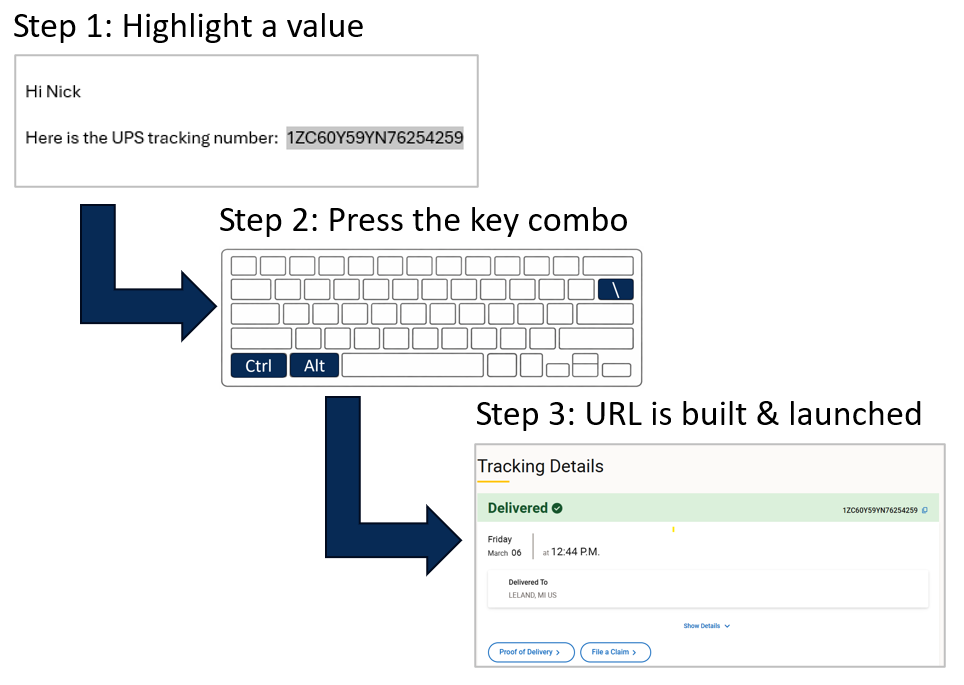
Evaluates highlighted text, identifies the app, builds the URL, and lauches the browser
The user highlights a record or document ID from anywhere (e-mail, chat, report, another system, etc.)
User simulataneously presses:
Ctrl + Alt + \
quickNAV matches the highlighted text to the appropriate application, builds the URL, and launches the browser.
Evaluates the clipboard and pastes the direct link URL
The user copies a record or document ID from anywhere (e-mail, chat, report, another system, etc.)
User simulataneously presses:
Ctrl + Alt + ]
quickNAV matches the copied text to the appropriate application, builds the URL, and pastes it wherever the user specifies
quickNav is especially valuable in environments where employees move constantly across systems and records
User receives an e-mail, chat message, or a report with a document or record ID. They need to open the document in the source system to view details or take action
Support is sending an e-mail or chat to someone, and they want to hyperlink the document or record ID to remove friction and improve the receiving user's experience
Sourcing Projects, Contracts, Requisitions, Budget records, Purchase Orders, Receipts, Invoices, Payments
Shipment tracking numbers, Vendor records
Incidents, Requests, Tickets, Tasks
quickNav uses a straightforward annual licensing model designed for enterprise deployment. Pricing is based on estimated number of users.
Customers justify the investment through reduced friction, elimination of wasted time, and improved end user experience.
Annual licensing starts in the low five figures
Evaluation agreements are available
Book a demo to see quickNAV in action and discuss pricing, pilot options, and fit for your environment
